

Prometheus and Grafana metrics on a data center twin
Today the way in is a CSV. Export a Grafana panel (Inspect → Data → Download CSV) or a Prometheus range query, reshape it into the template's Readings sheet as one row per time, item, metric and value, and import the workbook. item is the device, rack or PDU name in your twin; metric is a name such as power_w, current_a, inlet_temp_c or gpu_util_pct. Measured watts replace the catalog's typical draw, per-phase current drives the PDU phase-balance check, and three or more times per item and metric are kept as a history. A Prometheus collector is built into the DC Sim agent but not yet tested against live exporters, so it is on the Roadmap.
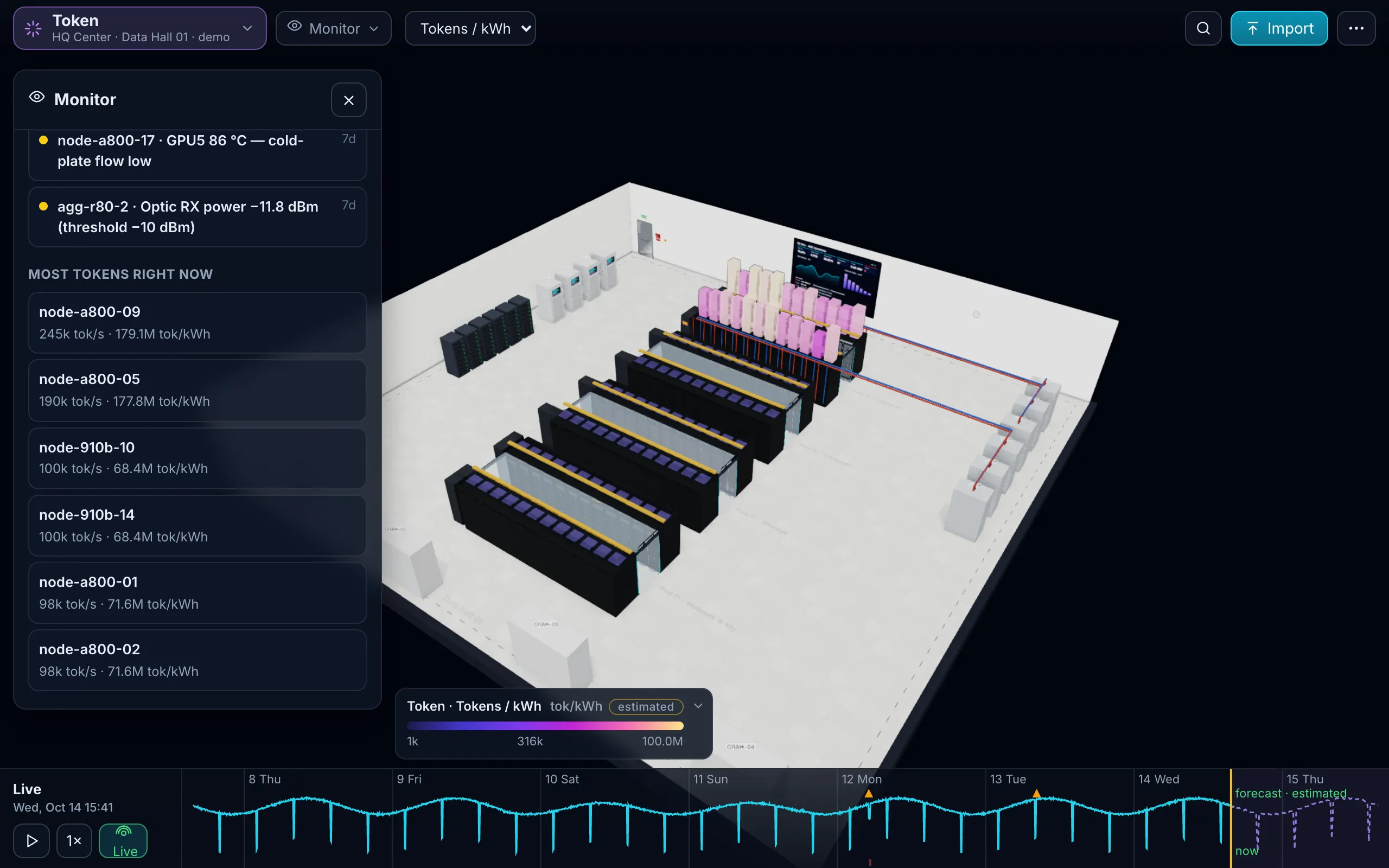
Where rack power comes from in Prometheus
Prometheus does not measure anything itself; exporters do. For a rack, four of them cover power and temperature:
| Measurement | Exporter | Example metric (check your exporter version) | Readings metric | item |
|---|---|---|---|---|
| Server power | ipmi_exporter (DCMI) | ipmi_dcmi_power_consumption_watts | power_w | the device |
| Server inlet temperature | ipmi_exporter | ipmi_temperature_celsius{name=~".*Inlet.*"} | inlet_temp_c | the device’s rack |
| PDU power and current per phase | snmp_exporter with your PDU’s MIB module | vendor-specific | power_w, current_a | the PDU; PDU-R01-A:L1 … :L3 per phase |
| UPS runtime, load, charge | snmp_exporter with the standard UPS-MIB | upsEstimatedMinutesRemaining, upsOutputPercentLoad, upsEstimatedChargeRemaining | ups_runtime_min and the rest under their own names | the UPS |
| GPU utilisation | the GPU telemetry exporter | its utilisation gauge | gpu_util_pct | the server |
| Tokens | vLLM’s generation token counter | rate(vllm:generation_tokens_total[5m]) | tokens_per_s | the server |
| Link traffic | snmp_exporter with IF-MIB | rate(ifHCInOctets[5m]) * 8 / 1e6 | link_mbps | device:port |
Server power can also come from a Redfish exporter on the BMCs; what matters for the twin is one power series per device, in watts.
What each Readings metric does in the twin
| Metric | item | Effect |
|---|---|---|
power_w | a device, PDU or UPS | replaces the catalog’s typical draw; rack, PDU and UPS loads add up from it, so failover overloads use your numbers |
current_a | PDU name:L1, :L2, :L3 | the PDU’s load per phase and its phase-balance check |
link_mbps | device:port | link utilisation in the Network view, following the time slider |
inlet_temp_c, outlet_temp_c, humidity_pct | a rack or sensor | stored as that rack’s measured values |
gpu_util_pct, tokens_per_s | a server | stored as that server’s measured utilisation and token rate |
ups_runtime_min | a UPS | what the UPS reports; the simulator’s battery comes from runtime_min in the Power sheet |
| anything else | any item | kept as a reading on the item |
Rows with three or more times for one item and metric become a series. The latest value is what the checks use; a link_mbps series also moves with the time slider in the Network view.
Grafana draws the rack; it cannot fail it
A Grafana Canvas panel can put a floor plan behind your racks and turn R05 red when its PDU passes 86 %. A heatmap can colour every rack by kW. Both are pictures of values. Neither knows that the servers in R05 have one cord on PDU-R05-A and one on PDU-R05-B, so neither can tell you that losing feed A puts PDU-R05-B at 113.9 % of its rating. That answer needs the power chain, which comes from the Power and Cables sheets, plus your measured loads.
1. Put a device label on every series
Prometheus series carry an instance such as 10.0.40.21:9290; the twin knows gpu-0301. Join them once, in Prometheus, with static labels per target:
- job_name: ipmi
  static_configs:
    - targets: ['10.0.40.21']
      labels: { device: 'gpu-0301', rack: 'R03' }
    - targets: ['10.0.40.22']
      labels: { device: 'gpu-0302', rack: 'R03' }
The same names then work in PromQL (sum by (rack) (ipmi_dcmi_power_consumption_watts)), as Grafana legends and in the Readings sheet. If you cannot touch Prometheus, keep a two-column lookup in the workbook (instance → device name) and fill item with a lookup.
Export per device, not per rack. The twin adds devices up into racks, PDUs and UPSes itself, and a failure has to know which device sits on which feed.
2. Export from Grafana
- In the query’s Legend option choose Custom and use the
devicelabel as the legend, so each column header is a device name. - Open the panel menu → Inspect → Data.
- Under data options, choose Series joined by time for a panel with several series, and turn Formatted data off, so values are plain numbers without units.
- Download CSV. You get a wide table: a time column, then one column per device.
Then reshape it into Readings in Excel: Data → From Text/CSV → Transform Data, select the time column, Unpivot Other Columns, rename the two new columns item and value, add a column metric (for example power_w), and load the result into the Readings sheet in the order time, item, metric, value.
If the time column comes out as Unix milliseconds (13 digits), convert it with =A2/86400000+DATE(1970,1,1), add your UTC offset in hours ÷ 24, format it as yyyy-mm-dd hh:mm and paste it back as values. DC Sim reads sheet times as the room’s wall-clock time.
3. Or query Prometheus directly
The range-query API returns every series with its labels, and jq turns it into Readings rows. One metric per call:
echo 'time,item,metric,value' > readings.csv
curl -s http://prometheus:9090/api/v1/query_range \
  --data-urlencode 'query=ipmi_dcmi_power_consumption_watts' \
  --data-urlencode 'start=2026-10-20T00:00:00Z' \
  --data-urlencode 'end=2026-10-27T00:00:00Z' \
  --data-urlencode 'step=15m' \
| TZ=Europe/Berlin jq -r '.data.result[] | .metric.device as $d | .values[]
    | [(.[0] | strflocaltime("%Y-%m-%d %H:%M")), $d, "power_w", (.[1] | tonumber)] | @csv' \
>> readings.csv
Repeat with current_a (the PDU’s per-phase metric, item PDU name:L1), inlet_temp_c, tokens_per_s and the rest, appending to the same file. Set TZ to the room’s time zone so the times line up with the room’s clock. Counters (tokens, interface octets) go in as rates: put the rate(...) in the query, not the raw counter.
4. Check before you import
- Size: 50,000 rows per sheet, 5,000 points per series. A week at a 15-minute step is 672 points per series, about 74 series per sheet; at 1 hour, 168 points and about 297 series; at 5 minutes, 2,016 points and about 24 series.
- Units: watts, not kilowatts, for
power_w; amps forcurrent_a; °C for temperatures. Divide deciamps or multiply kW in the query, not in your head. - Names: every
itemmust exist in the twin as a device, rack or power node. An unknown item is skipped and listed with its sheet, row and reason; the rest of the import goes on. - Values: plain numbers in the metric’s unit, without thousands separators. A formatted export that says 3.2 kW is read as 3.2, which
power_wtakes as 3.2 W; 1,234 is read as 1.234, because a comma counts as a decimal mark.
Then paste the rows into the Readings sheet of the Excel template and import. A re-upload with a new week of readings is an update: devices keep their identity by serial, then name, then rack and U.
5. A Grafana alert that catches failover overload
Keep alerting in Grafana; just alert on the right number. A rack on two 16 A, 230 V PDUs has 3.68 kW per PDU, and 80 % of that is 2.94 kW. If one feed fails, the other carries the whole rack, so the alert belongs on the sum of both feeds, not on each PDU:
sum by (rack) (pdu_power_watts) > 2944Replace pdu_power_watts with your PDU power metric, labelled by rack. The rack power calculator does the same sum per rack. The twin then answers the question the alert cannot: fail UPS-A at peak and see every PDU, panel and UPS that ends above its rating, and which services stop.
6. What the agent collector will add (Roadmap)
The Prometheus collector is built into the DC Sim agent and not yet tested against live exporters. When it ships, it scrapes exporter /metrics endpoints from inside your network over one outbound WebSocket, with no remote-write, push gateway or scrape target to expose.
| Item | Status |
|---|---|
| Collector scraping your exporters through the agent: GPU telemetry, serving-stack token counters, node_exporter, ipmi_exporter, snmp_exporter with UPS-MIB | Roadmap (built, in testing) |
| Read from the Prometheus server itself, one target instead of one per exporter | Roadmap |
| Grafana panel: the 3D twin as a panel whose time range follows the dashboard | Roadmap |
| Grafana alert rules as DC Sim alarms with advice | Roadmap |
Until then, the CSV route above gives the twin the same numbers, a week at a time.
6 steps
Put a device label on every series
In Prometheus, add a device label (and a rack label) to each target with the same name the device has in the Devices sheet, through static labels or relabelling. Without it, series carry only an address.
Choose the series and the step
Per-device power, PDU current per phase, rack inlet temperature, UPS runtime and token rates; a week at a 15-minute step is 672 points per series.
Export the data
From Grafana: panel menu → Inspect → Data → Download CSV, with Formatted data off. From Prometheus: a query_range call with curl, turned into CSV rows with jq.
Reshape into time, item, metric, value
Unpivot a wide Grafana CSV so each value is one row, write times as 2026-10-01 14:00 in the room's local time, keep values as plain numbers and export counters as rates.
Paste into the Readings sheet and import
Add the rows to the Readings sheet of the template and import. Read the skipped rows: an unknown item or a missing value is listed with its sheet, row and reason.
Repeat when you need fresh numbers
Re-upload the workbook with a new week of readings. A re-upload is an update: devices keep their identity and you see a change list before it is applied.
What happens in this clip
- Demo hall: 13 racks, fed from feed A and feed B, in the Power layer with the room lights off.
- Lose feed A at peak: the one-line power diagram shows the chain from utility and generator through the ATS, UPS-A and UPS-B, the panels and every rack PDU.
- Fail UPS-A. Banner: 2 devices lose power, 90 run on one feed, overloaded: PDU-R05-B at 113.9 %.
- Single-corded devices go dark and the other PDU overloads; the 3D room shows the racks on one feed in amber.
- The scenario timeline lists which services stop and which racks survive on one feed.
- End card: Fail anything. See what goes dark.
Is there a live Prometheus or Grafana connector?
Not yet. Today a Grafana panel's CSV export or a Prometheus query goes into the Readings sheet of the template. The Prometheus collector is built into the DC Sim agent and not yet tested against live exporters; reading the Prometheus server itself and a Grafana panel that embeds the twin are on the roadmap.
Which metric names does the Readings sheet understand?
The template lists power_w, current_a, inlet_temp_c, outlet_temp_c, humidity_pct, link_mbps, port_errors, gpu_util_pct and tokens_per_s. power_w and per-phase current_a set loads and link_mbps sets link utilisation; other names, such as ups_runtime_min, are kept as readings on their item.
How do I match Prometheus series to devices?
Give each target a device label equal to the device's name in the Devices sheet, in Prometheus or with a lookup column in Excel. For per-phase current use the PDU name and the phase, such as PDU-R01-A:L1; for a switch port use device:port.
How much history can I import?
Up to 50,000 rows per sheet and 5,000 points per series. A week at a 15-minute step is 672 points per series, so one sheet holds about 74 series for a week; at a 1-hour step, about 297.
Can Grafana show a 3D data center?
Grafana draws in 2D: a Canvas panel places values on a floor-plan image and a heatmap colours a grid. Neither knows which PDU feeds which server, so neither can fail one. A Grafana panel that shows the DC Sim twin is on the roadmap.
One Excel file. Your room in 3D.
Download the import template (v1.5, twelve sheets, only Devices required) and the filled example from our demo hall. No form, no email needed, no macros in the files.
Fill in the Devices sheet and send it with your walkthrough request; we import it on the call. What each sheet does