

How to turn NetBox into a 3D data center model
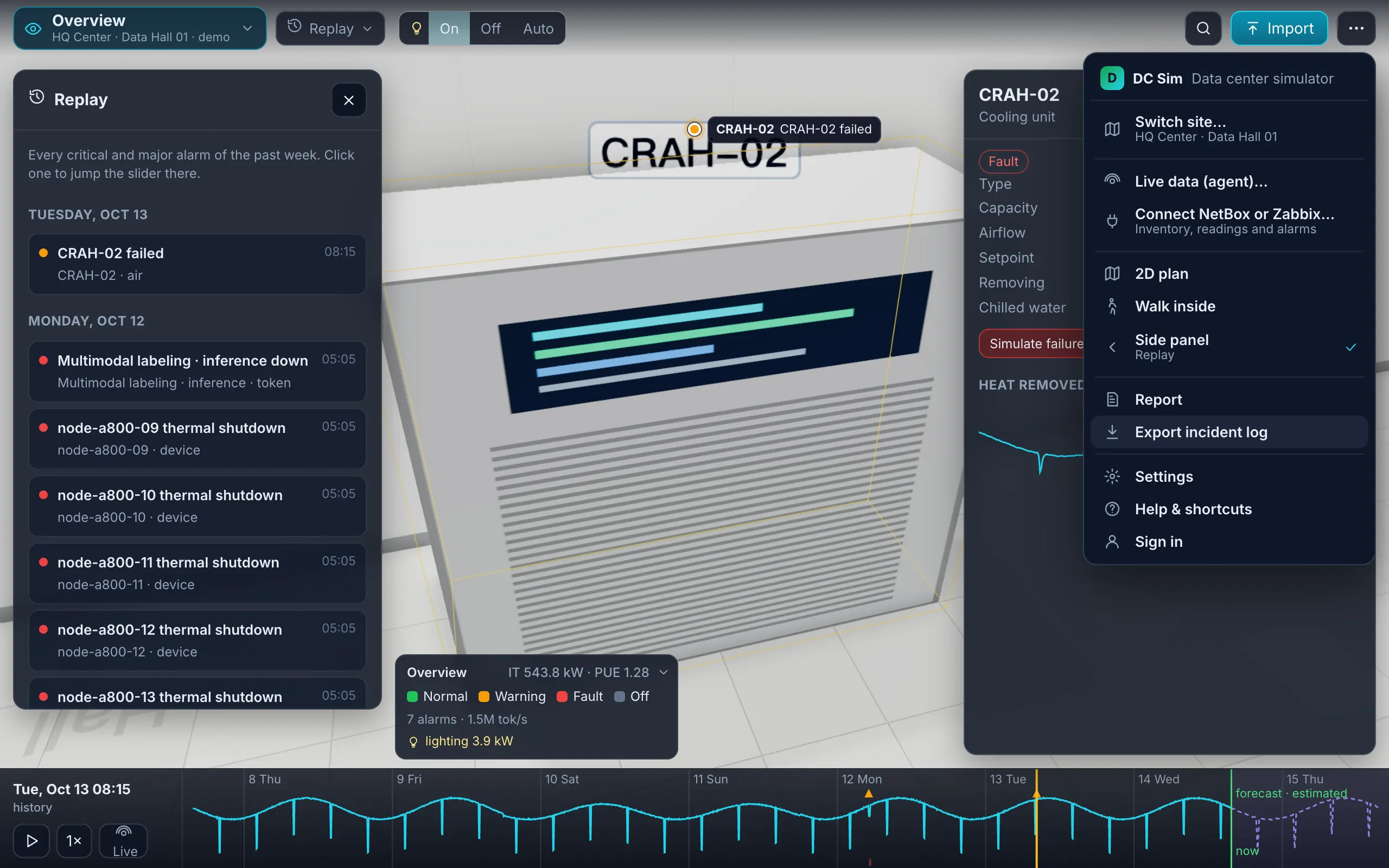
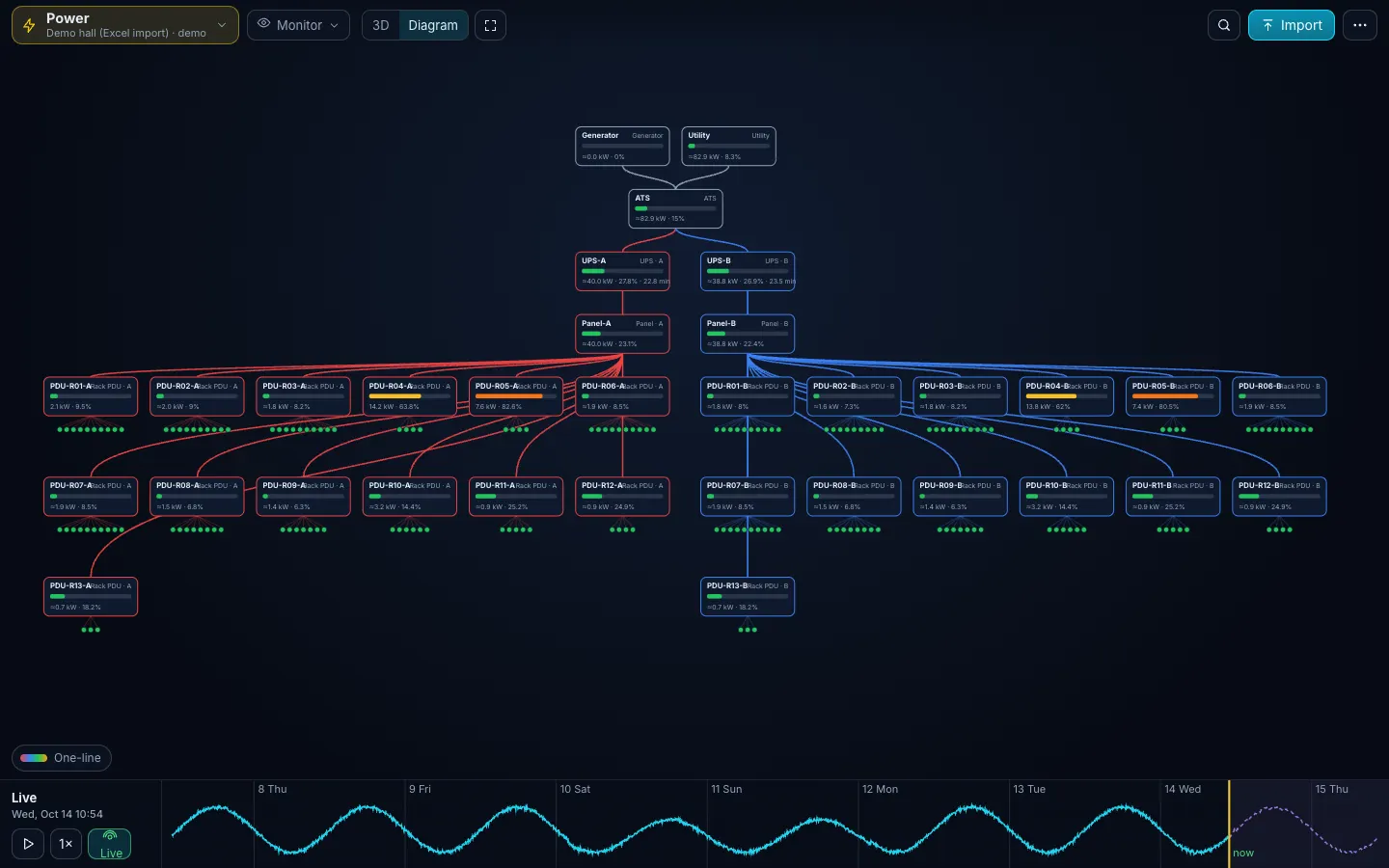
Open-source NetBox draws racks as 2D elevations; NetBox Labs' Visual Explorer, a NetBox Cloud preview since March 2026, adds 2D and 3D floor plans. DC Sim reads a NetBox site through the REST API with a read-only token and builds it in 3D: racks stand in rows by their location, devices take their height from the device type and their weight and power from the catalog, power panels, feeds and PDUs become the one-line diagram, cables are routed in 3D and VLANs become networks. The steps are Connect, Test, pick a site, Preview, Import, then re-sync against a change list. What NetBox does not hold (the UPS and generator above the panels, rack kW budgets, cooling, measured loads) goes into the template sheets.
What NetBox gives a 3D model, and what it doesn’t
NetBox is a source of truth for DCIM and IPAM: sites, locations, racks, device types, devices, cables, power panels and power feeds, VLANs and prefixes, all behind a REST API. Open-source NetBox renders rack elevations as 2D SVG and holds no heat or measured load. NetBox Labs’ Visual Explorer, a customer preview for NetBox Cloud since March 2026, adds floor plans in 2D and 3D, a power chain view that shows redundancy gaps, and metric overlays on the same data. Its launch post describes no failure simulation; running the failure (what goes dark, what overloads, how fast the room heats) is the part DC Sim adds.
A 3D model of a room needs five things: racks in rows, devices with height, depth, weight and power, the power chain from utility to PDU, the cables, and the cooling. NetBox has the racks (rows only through locations), most of the device data, the lower half of the power chain and all of the cables. It has no cooling. This guide covers how each NetBox object lands in DC Sim, what to fix in NetBox first, and which template sheet fills each gap. A data center digital twin is the model that can answer “what happens if this fails?”; NetBox supplies the inventory it starts from.
1. Before you connect: version, user, token, network
- Version: NetBox 3.3 or later, 4.x included. Tested against NetBox 4.7.3 with its demo data.
- User: a dedicated user with view permission only (table below).
- Token: an API token with write disabled. NetBox 4.5 and later issue v2 tokens starting with
nbt_, sent as a Bearer token; older tokens are sent asToken. DC Sim picks the format from the token’s shape. The token is sent to NetBox only and is never shown in the browser or stored in a report. - Network: a NetBox the DC Sim server can reach is read directly. A NetBox inside your network is read by the DC Sim agent, which only dials out; by default the server refuses private addresses on the direct path. Through the agent the token stays in the agent’s configuration, and the inventory snapshot is refreshed every hour by default.
| NetBox | View permission on | Used for |
|---|---|---|
| DCIM | sites, locations, racks, device types, devices | the room, rows, devices |
| DCIM | cables, power panels, power feeds, power outlets | cabling, the power chain, phases |
| IPAM | VLANs, prefixes | the Networks sheet |
| Circuits | circuits, circuit terminations | links between sites |
DC Sim has no self-serve accounts yet. Today these steps run in a walkthrough with you, on your NetBox or on its CSV exports.
2. What maps where
The connector turns NetBox into the template sheets, so a NetBox import gets the same import report, checks and change list as an Excel upload.
The room and the devices
| NetBox | Template | In 3D | Watch for |
|---|---|---|---|
| Rack location | Racks: row | racks stand in rows | no location: the site is the row |
| Rack name | Racks: position (order by name) | order along the row | names out of floor order put racks out of order |
| Rack height, width | height_u, width_in | width 10 draws a mini rack | |
| Device: rack, position, device type | Devices: rack, u, model, height_u | the device in its slot | manufacturer + model matched to the catalog; unmatched becomes a box of the right height tagged “identify later” |
| Device with no rack | kept unracked at its location | on an open shelf | never dropped |
| Device in a device bay | carried by its chassis | blades travel with the chassis | |
| Role, serial, tenant | role, serial, owner | tenants on the Device layer | serial is the first key on re-sync |
Custom fields warranty_end, runs | warranty_end, runs | warranty flags, service names in failures | create them in NetBox if you want them carried |
Power, cables and networks
| NetBox | Template | In 3D | Watch for |
|---|---|---|---|
| Power panel | Power: type panel | a node on the one-line diagram | NetBox has no rating field on a panel: each one is a warning |
| Power feed | Power: a breaker under its panel; primary = feed A, redundant = feed B; amperage, voltage, phase | A and B colours | feeds without an amperage are flagged |
| Device with role or type PDU | Power: type PDU, fed from the feed cabled to its input | PDU strip with a load bar | a PDU without the PDU role is an ordinary device |
| Power outlet feed leg A, B, C | Cables: phase L1, L2, L3 | per-phase load, phase balance | |
| Cable: both ends, type, length, colour, label | Cables: from/to device and port, media, length_m, color, label | routed runs you can trace | cat6a → Cat6A, mmf-om4 → OM4, smf → OS2, dac → DAC; lengths in metres |
| Cable from a PDU outlet to a power port | Cables: type power | which power supply sits on which PDU | without these the power path is assumed |
| VLAN and its prefix | Networks: vlan, name, purpose, subnet | VLAN colours in the Network view |
Sites and circuits
| NetBox | Template | In 3D | Watch for |
|---|---|---|---|
| Site with latitude and longitude, region, time zone, tenant | Sites: lat, lon, city, timezone, provider | a pin in the Estate view | no coordinates, no Sites sheet |
| Circuit with a site at both ends | Links: commit rate → bandwidth_gbps, tag protected, provider → carrier | an arc you can cut | circuits with one site end are left out of the WAN |
| Circuit cable into a patch panel | left out of Cables, listed in the notes | an ISP hand-off has no device at that end |
Interface speeds are not read from NetBox today: port names and the catalog give the kind of port. Reading them is on the roadmap, as are two-way sync (a DC Sim design pushed back into NetBox as planned objects, opt-in) and a NetBox plugin with an “Open in DC Sim” link on a rack or device.
3. Connect, Test, Preview, Import
- In DC Sim open ⋯ → Connect NetBox or Zabbix, choose NetBox, paste the URL and the token, press Test.
- Test shows the NetBox version and every site with its racks and devices, biggest first. Against the NetBox 4.7.3 demo instance it reads 24 sites, 42 racks, 72 devices, 108 cables, 48 power feeds and 63 VLANs in about a second.
- Pick the site. One site is one import, because an estate is not one room.
- Preview lists the sheets with their row counts and the import report. The demo’s biggest site, MDF, previews as Racks 26 · Devices 14 · Cables 12 · Power 52 · Networks 0, with 0 skipped rows, 0 unknown models, 4 warnings (its four power panels have no rating) and a note that 3 provider-circuit cables were left out.
- Import. The room builds in 3D with the checks pinned where they apply.
- Re-sync when NetBox changes. You get a change list (devices, racks, cables, power nodes and VLANs added, removed or changed) before anything is applied.
4. Fix these in NetBox before you import
Each of these changes the model, and each is easier to fix once in NetBox than every time in a sheet.
- Feed types. Mark one power feed of each rack pair as primary and the other as redundant. Two primary feeds both become feed A, and every dual-corded device on them is flagged as having both cords on one feed.
- PDU role. Give PDUs a role (or device type) that says PDU. Only then do they become Power rows fed from their power feed, with a rating and a load.
- Power cables. Cable each device power port to a PDU outlet. Without them DC Sim knows which rack a server is in but not which PDU feeds each of its power supplies, and the “No PDU known for a rack” check says the power path is assumed.
- Rows. If a location is a whole room, add a child location per row and put the racks in it. Name racks in floor order (A01, A02 …) so the order along the row is right.
- Ratings. Fill amperage, voltage and phase on every power feed. Feed ratings are what the 80 % checks and the failover overloads are measured against.
- Services and warranty. Add the custom fields
runs(what runs on the device) andwarranty_endon devices. Withoutruns, a failure can say which devices go dark but not which services stop. - Device types. Use the manufacturer and model as the vendor prints them, with the right U height. The community device-type library is CC0-licensed and is being added to the DC Sim catalog, so more types resolve to a real weight and power draw.
5. What NetBox alone cannot tell you
| Question | Why NetBox cannot answer it | What fills the gap |
|---|---|---|
| What goes dark if UPS-A fails? | NetBox’s power model starts at the panel: there is no UPS, ATS or generator, and no load | Power sheet rows for utility, generator, ATS and UPS with rating, fed_from and runtime_min or battery_kwh; a rating for each panel |
| Does the rack survive on one feed? | NetBox stores ratings and allocated draw, not measured load | loads from the catalog’s typical draw per model, or measured from Zabbix or a Readings sheet; max_kw per rack in Racks |
| How fast does the room heat up if a cooling unit stops? | NetBox has no cooling and no airflow | Cooling sheet (name, type, capacity_kw, serves) and front_faces in Racks for the aisles; minutes to 27, 32 and 35 °C are estimated by a zonal air model, not CFD |
| Which services stop? | NetBox has no service-to-device link by default | the runs custom field, or the runs column in Devices |
| Does the new server fit the rack depth? | NetBox device types carry a full-depth flag, not a depth in millimetres | device depth from the catalog for matched models; depth_mm in Racks (template v1.5) flags devices deeper than the rack |
| Which racks lose cooling if a manifold leaks? | NetBox has no liquid loops | the Liquid sheet: CDUs, manifolds and the racks they serve |
With the chain filled in, the UPS failure impact analysis runs on your room: fail UPS-A and read the four lists (dark, on one feed, services stopped, overloads).
6. Keep one master
Today a NetBox import and an Excel upload each build the whole room; they are not merged. A re-sync builds the room from NetBox again, and layers NetBox does not hold fall back to defaults marked “assumed” unless you upload them again. So pick one master per room:
- NetBox is the master when the questions are inventory, cabling and the panel-to-PDU chain. Keep everything in NetBox (section 4), re-sync, read the change list.
- The workbook is the master once you add the UPS chain, cooling, liquid and readings. Import from NetBox once, download the model as the filled Excel template, add the sheets NetBox has no place for, and upload. When NetBox changes, re-sync, download the filled template again, put your own Power rows above the panels, Cooling, Liquid and Readings back in, and upload.
Either way the change list shows exactly what an upload or re-sync would change before it is applied.
7 steps
Create a read-only NetBox user and token
Give the user view permission on sites, locations, racks, device types, devices, cables, power panels, power feeds, power outlets, VLANs, prefixes and circuits. Create an API token with write disabled.
Fix four things in NetBox first
One primary and one redundant power feed per rack, PDUs with the role PDU, power cables from PDU outlets to device power ports, and one location per row of racks with racks named in floor order.
Connect and Test
In DC Sim open ⋯ → Connect NetBox or Zabbix, choose NetBox, paste the URL and the token and press Test. Test shows the NetBox version and every site with its racks and devices, biggest first.
Pick a site and Preview
Preview shows the site as template sheets (Racks, Devices, Cables, Power, Networks) with the import report: skipped rows, warnings, unknown models and notes such as cables left out.
Import and read the checks
Import builds the room in 3D and pins the checks to their place: single-corded and same-feed devices, PDUs over 80 %, feeds without a rating, phase imbalance.
Fill the gaps NetBox has no place for
Add the UPS, ATS and generator rows, panel ratings, rack kW budgets, cooling units and measured readings in the template sheets, so a failure can be followed from the utility to the server.
Re-sync when NetBox changes
A re-sync shows a change list of added, removed and changed devices, racks, cables, power nodes and VLANs before anything is applied. Devices keep their identity by serial, then name, then rack and U.
What happens in this clip
- One file: the demo hall workbook in Excel. Devices is the only required sheet (rack, U, model, name, role, power cords, owner, warranty, what runs on it); the Cables sheet adds the cords.
- Import: the preview counts 121 devices, 13 racks, 910 cables and 35 power items and lists the matched models.
- Checks with 3D locations: U overlaps, breakers above 80 %, both power supplies on the same feed, heat above cooling.
- Apply: the room builds from the spreadsheet; Overview, Power (load per rack) and the Cabling view.
- Back in Excel one row is edited (a server moved from U2 to U30) and the file re-uploaded: the change list shows exactly what changed.
- End card: Download the template.
Can NetBox show racks in 3D on its own?
Open-source NetBox draws rack elevations as 2D front and rear views, and community plugins add 2D floor plans. NetBox Labs' Visual Explorer, a customer preview for NetBox Cloud announced in March 2026, adds 2D and 3D floor plans, a power chain view and metric overlays from NetBox data. DC Sim adds the simulation: it reads NetBox with a read-only token and lets you fail a UPS, feed, cooling unit or switch to see what goes dark, with estimated thermal impact.
What permissions does the NetBox token need?
View only: sites, locations, racks, device types, devices, cables, power panels, power feeds and power outlets in DCIM, VLANs and prefixes in IPAM, and circuits with their terminations. Use a token with write disabled. DC Sim never writes to NetBox.
Which NetBox versions work?
NetBox 3.3 and later, including 4.x, with both the older tokens and the v2 tokens of NetBox 4.5 and later. It is tested end to end against a NetBox 4.7.3 demo instance with 24 sites.
Why do all my racks end up in one row?
Rows come from the rack's location in NetBox, and the position in the row from the order of rack names. If your locations are rooms, add a child location per row and name racks in floor order, or set row and position in the Racks sheet.
Can I do this without API access to NetBox?
Yes. NetBox's own CSV exports map onto the template sheets; header names are matched with synonyms. You lose the one-click re-sync, not the model.
Does it work with a NetBox inside our network?
Yes. The connector then runs in the DC Sim agent, which dials out over one WebSocket and never listens on a port. The token stays in the agent's configuration file.
One Excel file. Your room in 3D.
Download the import template (v1.5, twelve sheets, only Devices required) and the filled example from our demo hall. No form, no email needed, no macros in the files.
Fill in the Devices sheet and send it with your walkthrough request; we import it on the call. What each sheet does