

Data center cabling documentation: what to record and how to trace a cable
Document data center cabling as one row per cable: from device and port, to device and port, type, media, speed, length, label, VLANs and route. Give every cable one unique label, from a scheme such as ANSI/TIA-606, printed on both ends and identical to the record. A connection through a patch panel is two rows, device to panel port and panel port to switch, so a trace can follow the rows end to end. LLDP only reports the device at the far end of an active link, never the passive panels in between, so the record is the only map of the physical path.
1. What to record for every cable
One row per cable, one cable per row. These are the DC Sim template’s Cables columns; from_device, to_device and type are required, the rest make the record useful.
| Column | Example | Why it matters |
|---|---|---|
| from_device, from_port | k8s-0103, iDRAC | Where the cable starts. Ports are free text: Gi1/0/1, eth0, SFP+1, port 5, PSU1, outlet 3 |
| to_device, to_port | cp-r01, port 5 | Where it ends. A patch panel is a device with ports |
| type | network | power, network, storage or console: decides which questions the cable answers |
| media | Cat6A | Copper category, OM3/OM4 multimode, OS2 single-mode, DAC. A port check needs it |
| speed | 1G | Catches a 10G optic in a 1G port before anyone plugs it in |
| length_m | 2 | Spares, slack in the tray, and a check that the cable reaches |
| label | M-0017 | The string printed on both ends |
| vlan | 40 | One or more VLANs, so a port change can be checked against the network plan |
| route | in rack | in rack, overhead tray T2, under floor: where to look for it |
| color, phase | blue, L2 | Colour as installed; phase on power cables for phase balance |
Fibre and copper differ in what you must write down. For fibre, the grade (OM4 or OS2) matters as much as the speed, because an OM4 patch into an OS2 port does not work at any speed. For MPO trunks also record the polarity method (A, B or C in TIA-568) and the cassette at each end. For copper, the category and whether it is a DAC are what a port check needs.
A record is only as good as its last update. Change the row in the same ticket as the cable, and walk a sample of racks on a schedule (section 6). A stale record costs you twice: minutes spent tracing during an outage, and the wrong cable pulled during a change.
2. Labels: one name, printed on both ends
ANSI/TIA-606, the administration standard for telecommunications infrastructure (revision D, 2021), is the reference: every space, rack, panel, port and cable gets a unique identifier, built from its location, that matches the records. For a 10-to-50-rack room the practical rules are simpler:
- Racks by row and position (R05, or A05 for row A), the same name in every sheet.
- Panels by rack and use (the demo hall’s copper panel in R01 is cp-r01). They are devices in the Devices sheet with a U position.
- Cables by type and number: the demo hall uses P- for power, N- for network, M- for management, S- for storage and C- for console, then a sequence (M-0017). A location-encoded label (R01-U42-05 to R11-U40-05) reads well in the room but must be reprinted when anything moves; a sequence never changes and the record holds the ends.
- Both ends, machine-printed, within reach of the connector. A label you cannot read with the cable plugged in will not be read.
- Never reuse a label number. A retired cable’s number stays retired, or old tickets point at the wrong cable.
3. Patch panels are two rows, never one
A server’s management port reaching the out-of-band switch through two copper panels is three cables, so three rows. This is a real path in the DC Sim demo hall:
| label | from_device | from_port | to_device | to_port |
|---|---|---|---|---|
| M-0017 | k8s-0103 | iDRAC | cp-r01 | port 5 |
| M-0018 | cp-r01 | port 5 | cp-r11a | port 5 |
| M-0019 | cp-r11a | port 5 | oob-01 | Gi1/0/5 |
The middle row is the permanent link between the rack’s panel and the row-end panel, run through the overhead tray. Writing one row from k8s-0103 to oob-01 looks tidier and is wrong: the day someone repatches cp-r11a, the record still claims a path that no longer exists, and nobody knows which panel port to check.
A colocation cross-connect follows the same rule: the provider’s panel in the meet-me room is a device, and the cross-connect is its own row, labelled with the provider’s circuit ID.
4. How to trace a cable end to end
On paper: find the row with the device and port you start from; read to_device and to_port. If that is a panel, find the row that leaves the same panel port on the other side and keep going until you reach a device that is not a panel. A lookup on device plus port does it in a spreadsheet.
In the room: read the label at each hop and compare it with the row. The tools only cover parts of the path:
| Method | Sees | Does not see |
|---|---|---|
| The record (sheet, DCIM, twin) | Every hop, route, label, VLAN | Anything changed since the last update |
| LLDP / CDP from the switch | The device at the far end of an active link | Patch panels, unpowered devices, the route |
| Toner and probe (copper) | One physical cable, even a dead one | Anything beyond the panel without re-toning |
| Visual fault locator (fibre) | Continuity and the far end of one strand | Which port it should be on |
Use LLDP as a cross-check of switch ports against the record. It cannot replace the record, because the panels in the middle are passive.
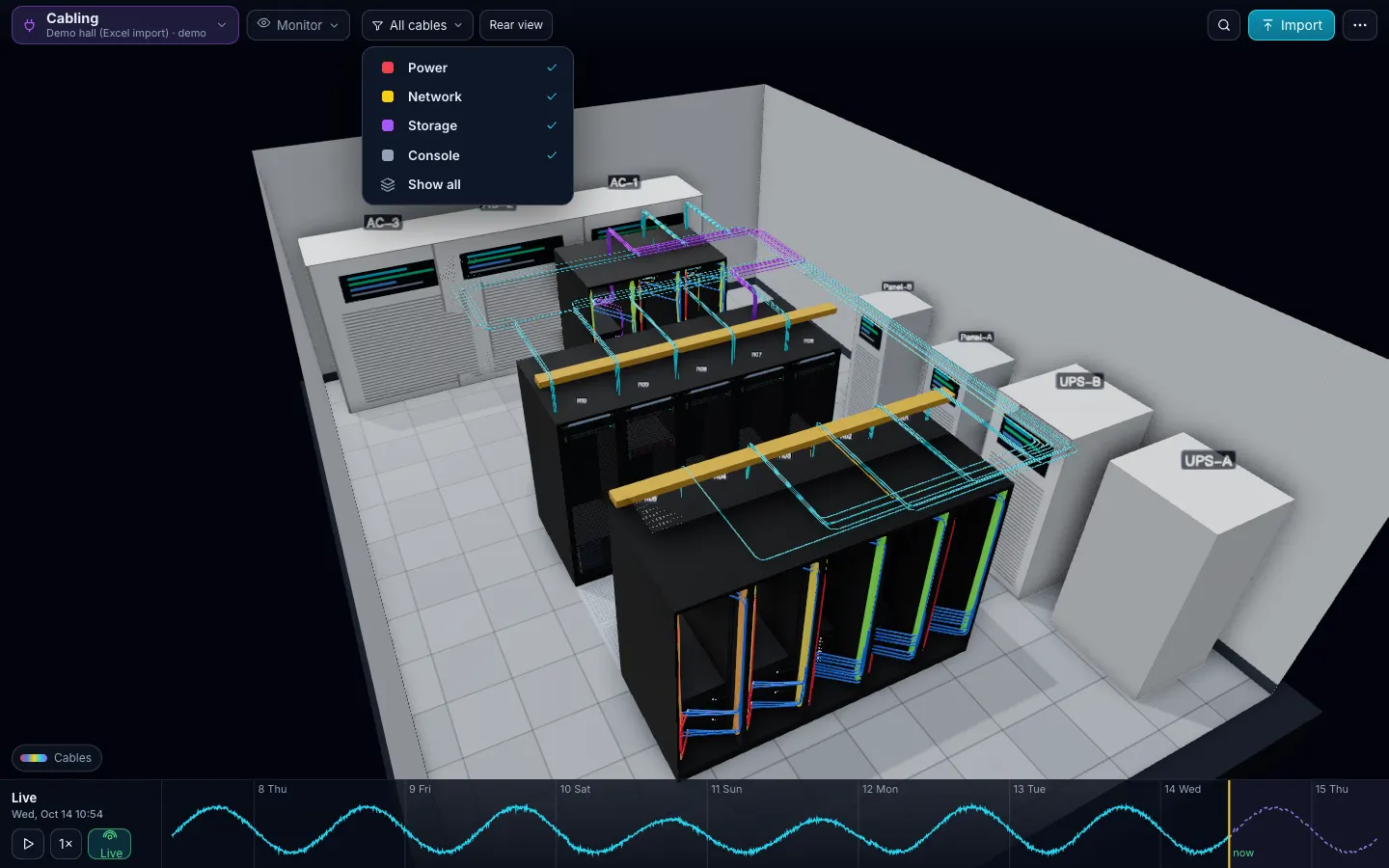
In DC Sim: in the Cabling view, click a cable to see both ends, ports, media, speed, length, label and VLANs. Trace lights the full path end to end through every patch panel, and cutting the cable shows who loses connectivity. The Network view builds the topology from the same rows with the panels collapsed, so a trace and a “fail this switch” question use one record.
5. Common errors and how to catch them
| Error | What it looks like | Catch it in the sheet | DC Sim check |
|---|---|---|---|
| Orphaned cable | A row names a device that is not in Devices, or a cable left behind after a decommission | Lookup of every from/to name in Devices | Unknown names in the Cables sheet are reported and the row is skipped |
| Device with no cable | A server with no network or power row | Count rows per device | Flagged: no network or power cable |
| Duplicate label | Two rows with M-0042 | Count of each label above 1 | Missing labels are flagged; check duplicates in the sheet |
| Port used twice | Two cables on one switch port | Count of device plus port across both ends | Flagged: port used twice |
| Speed or media mismatch | A 10G DAC on a 1G management port; OM4 into OS2 | Compare speed and media with the port’s model | Flagged per port |
| Too short | A 1 m cable between racks four metres apart | Length against the route | Flagged: shorter than the distance between its ends |
| Stale record | The trace says port 5, the room says port 7 | Only a process fixes this | Re-upload shows a change list |
The demo hall carries one planted cabling mistake, and the import finds it: M-0167: 10G on esx-0705 ilo (port max 1G), plus “DAC cannot plug into copper port”. Power cables get the same treatment: both power supplies on one feed is a cabling error with a power consequence, covered in the UPS failure impact analysis.
6. Keep it true
Documentation is only worth its last update. The rules that work in small rooms:
- Update in the change ticket. A move, add or change is not closed until the row is changed.
- Re-check after every change. Re-importing the sheet into DC Sim lists exactly what changed before anything is applied.
- Audit on a schedule your change rate justifies. A busy room walks a sample of racks every quarter; every room walks the racks it is about to touch before a maintenance window.
What undocumented cabling costs shows up in two places: the minutes spent tracing during an outage, and the wrong cable pulled during a change.
7. Where the cable list comes from
- Excel or CSV: the template’s Cables sheet, or a CSV file with the same columns. Start with power and uplinks; they answer the failure questions. The Excel guide covers the other sheets.
- NetBox: DC Sim connects with a read-only token and turns a site’s cables into the Cables sheet, lengths converted to metres; provider circuits are left out and listed. See NetBox to 3D.
- Another tool: export its cable list as CSV into the template’s columns. Nothing is written back to the source.
Dense GPU rows multiply rows, not columns. In the demo hall every GPU node has 2 × 100G uplinks to a leaf pair, every leaf has 4 × 100G OM4 to the spines through the rack fibre panel and the overhead tray, and every server has a 1G management link through two copper panels. Same rules, more rows: 910 cables for 13 racks.
The Cabling and Network layers page lists every cabling and network check. To see your own file in 3D, download the Excel template and ask for a walkthrough.
7 steps
Name every device, rack and patch panel once
One row per device in the Devices sheet, patch panels included, with the same name everywhere. A cable can only point at a name that exists.
Choose a label scheme and print both ends
One unique label per cable, machine-printed, on both ends within reach of the connector, and the same string in the record. Never reuse a retired number.
Record one row per cable
from_device, from_port, to_device, to_port, type, media, speed, length_m, label, vlan and route. For fibre add the grade (OM4, OS2) in media.
Record patch panels as two rows
Device to panel port is one row, the panel-to-panel trunk is another, panel port to switch is a third. Never shortcut a panel with one device-to-switch row.
Run the checks
Duplicate labels, ports used twice, cables to names that are not in Devices, devices with no cable, speed or media that does not fit the port, cables shorter than the distance between their ends.
Trace a sample end to end and verify it in the room
Pick a few paths per rack, follow them in the sheet, then check the labels at each hop. Fix the record, not just the cable.
Update it with every change
Every move, add or change updates the sheet in the same ticket. Re-import and read the change list before you trust the next trace.
What happens in this clip
- One file: the demo hall workbook in Excel. Devices is the only required sheet (rack, U, model, name, role, power cords, owner, warranty, what runs on it); the Cables sheet adds the cords.
- Import: the preview counts 121 devices, 13 racks, 910 cables and 35 power items and lists the matched models.
- Checks with 3D locations: U overlaps, breakers above 80 %, both power supplies on the same feed, heat above cooling.
- Apply: the room builds from the spreadsheet; Overview, Power (load per rack) and the Cabling view.
- Back in Excel one row is edited (a server moved from U2 to U30) and the file re-uploaded: the change list shows exactly what changed.
- End card: Download the template.
What should data center cabling documentation include?
One record per cable with both ends (device and port), type, media, speed, length, a unique label, VLANs and the route it takes. Patch panels are devices with ports, so a connection through a panel is two records. Add the power cables too: they decide which feed each power supply is on.
What is the TIA-606 labeling standard?
ANSI/TIA-606 is the administration standard for telecommunications infrastructure; revision D was published in 2021. It asks for a unique identifier for every space, rack, panel, port and cable, built from its location, and records that match the labels. Small rooms can use a simpler scheme as long as every identifier is unique and printed on both ends.
How do I document a patch panel connection?
As separate rows: server port to panel port, panel to panel for the trunk, panel port to switch port. A trace follows the rows through each panel. One row from server to switch hides the panel and breaks the trace the day someone repatches it.
Can LLDP or CDP replace cable documentation?
No. They tell a switch which device is on the other end of an active link, so they are a good cross-check for switch ports. They cannot see passive patch panels, unpowered devices or the route a cable takes, which is what you need when you pull or move a cable.
Is Excel enough, or do I need DCIM for cabling?
For a server room or a small data center a well-kept sheet is enough to record and trace cables. What it cannot do alone is draw the runs, check ports and media across thousands of rows, or show who loses connectivity when a cable or switch fails. Importing the sheet into DC Sim adds that without retyping.
Can DC Sim read cables from NetBox?
Yes. DC Sim connects to NetBox with a read-only token and turns a site's cables (both ends, type, length, colour, label) into the Cables sheet, then routes them in 3D. Provider circuits are left out and listed in the import notes.
One Excel file. Your room in 3D.
Download the import template (v1.5, twelve sheets, only Devices required) and the filled example from our demo hall. No form, no email needed, no macros in the files.
Fill in the Devices sheet and send it with your walkthrough request; we import it on the call. What each sheet does