

Hot aisle / cold aisle layout: airflow basics for small data centers
In a hot aisle / cold aisle layout, rows of racks face each other front to front so every server draws cool air from a shared cold aisle and exhausts into a hot aisle behind it, back to back with the next row. It works only if the two air streams stay apart: front-to-back equipment, blanking panels in every empty U, no gaps between racks, and cooling units that supply the cold aisles and take their air back from the hot ones. ASHRAE TC 9.9 recommends 18–27 °C at the server inlet.
Rack power calculator
Enter the devices in one rack with their typical draw (measured if you have it, otherwise an estimate per model). Results are estimates.
| Device | Qty | Watts each |
|---|---|---|
| Rack load | |
|---|---|
| Breaker capacity (80 % rule) | |
| Each PDU, normal | |
| Surviving PDU if one feed fails |
1. How the layout works, and why mixing hurts
Most IT equipment breathes front to back: fans pull room air in at the front, push it across the boards and exhaust it at the rear, warmer. Face two rows front to front and their intakes share one aisle; turn the next row back to back and the exhausts share another. The cooling supplies the first and takes its air back from the second.
Two things go wrong when the streams mix:
- Recirculation: hot exhaust finds its way back into an inlet: over the top of the rack, around the row ends, through an empty U. The top of a rack and the racks at the end of a row see it first.
- Bypass: cold supply air returns to the cooling unit without passing through any IT, through a perforated tile in the hot aisle, a cable cut-out, or an oversized supply.
Both lead to the same bad trade: the cooling runs colder supply air, or more fans, to keep the worst inlet in range, while its return air comes back cooler and the unit delivers less of its capacity.
The basics in one place: cold aisles about 1.2 m wide (two 600 mm floor tiles); supply through perforated tiles in the cold aisles of a raised floor, or from overhead or in-row units, and return from the hot aisles; about 300 m³/h (175 CFM) of air per kW at a 10 K rise; 18–27 °C at the inlet (ASHRAE); fixes in cost order, from blanking panels and seals to containment to more cooling.
2. Lay out the rows
- Rows front to front, then back to back. With four rows: rows 1 and 2 face each other (cold aisle), rows 2 and 3 turn their backs (hot aisle), rows 3 and 4 face each other again.
- Aisle width. A common choice is a cold aisle of two 600 mm floor tiles, about 1.2 m, so a full row of perforated tiles fits; hot aisles are often narrower. TIA-942 covers data center spaces and pathways, but take your aisle widths from your design and local codes. Check the clearances your rack and server vendors need to open doors and slide out the deepest device.
- Orientation of odd devices. Switches often breathe side to side or front to back depending on the fan module. Order the fan option that matches how the switch is mounted (port side in the hot aisle or the cold aisle), or fit a duct. Mounted backwards, a switch breathes hot aisle air.
- No holes in a row. A missing rack, an open side or an empty row end lets the hot aisle into the cold aisle. Fill gaps with blank panels or an empty rack and close the row ends.
Cooling unit placement:
| Cooling | Supply | Return | Place it |
|---|---|---|---|
| Perimeter units with a raised floor | Under the floor, up through perforated tiles in the cold aisles | From the room, ideally from the hot aisles | At the ends of the hot aisles, perpendicular to the rows; perforated tiles only in cold aisles |
| Perimeter units, no raised floor | Into the room or overhead ducts toward the cold aisles | From the room or a ceiling plenum above the hot aisles | Facing the cold aisles, returns over the hot aisles |
| In-row units | Into the cold aisle from inside the row | From the hot aisle behind them | Between racks, close to the heaviest loads |
| Rear-door heat exchangers | The rack’s own exhaust, cooled at its rear door before it reaches the room | The heat leaves through the door’s water or coolant loop | On the racks too dense for room air |
Small rooms and single rows. With one row, face the racks toward the cooling supply and keep the return path at the back of the row. With a wall-mounted split unit, put its supply at the rack fronts and its intake behind them; a unit blowing across the backs of the racks feeds them their own exhaust.
3. Blanking panels, gaps and containment
Close gaps before you buy anything, cheapest first:
- Blanking panels in every empty U. An empty U is an open window from the hot aisle to the cold aisle.
- Brush grommets or seals on every cable cut-out in the floor and the rack.
- Side gaps and row ends closed; no perforated tiles in hot aisles or under racks.
- Containment, once the gaps are closed:
| Cold aisle containment | Hot aisle containment | |
|---|---|---|
| What is enclosed | The cold aisle: doors at the ends, a roof or panels above the racks | The hot aisle, returned to the cooling through a ceiling plenum or in-row units |
| The rest of the room | Runs at hot aisle temperature | Stays at cold aisle temperature |
| Retrofit | Usually easier: doors and roof panels on existing rows | Needs a return path: ducts, plenum or in-row units |
| Watch out for | Equipment outside the aisle (tape, wall-mounted gear) breathing hot room air | Working conditions in the hot aisle during maintenance |
The order is also the cost order: blanking panels and grommets are consumables, containment is a project, and moving or adding cooling units is the largest step.
4. Inlet temperature: the numbers to aim for
Measure at the IT equipment inlet, not at the cooling unit’s return. ASHRAE TC 9.9, Thermal Guidelines for Data Processing Environments (2015 table) gives:
| Range | Dry-bulb inlet temperature |
|---|---|
| Recommended, classes A1 to A4 | 18–27 °C |
| Allowable, class A1 (enterprise servers and storage) | 15–32 °C |
| Allowable, class A2 | 10–35 °C |
| Allowable, class A3 / A4 | 5–40 °C / 5–45 °C |
The fifth edition (2021) adds class H1 for high-density air-cooled equipment, with a narrower recommended 18–22 °C. Your hardware’s class is in its specification.
The three thresholds DC Sim reports when cooling fails, 27, 32 and 35 °C, are the top of the recommended range, the top of A1 allowable and the top of A2 allowable.
5. How much air a rack needs
From the sensible-heat equation for air (standard air at sea level, about 1.2 kg/m³ and 1.0 kJ per kg per kelvin), every kilowatt of IT load at a 10 K rise from front to back needs about 300 m³/h, roughly 175 CFM. The servers’ fans set the rise, so the cooling must deliver at least what the racks pull, or the shortfall comes from recirculation.
| Rack load | Airflow at a 10 K rise | Airflow at a 15 K rise |
|---|---|---|
| 5 kW | 1,500 m³/h (880 CFM) | 1,000 m³/h (590 CFM) |
| 10 kW | 3,000 m³/h (1,760 CFM) | 2,000 m³/h (1,170 CFM) |
| 15 kW | 4,500 m³/h (2,640 CFM) | 3,000 m³/h (1,760 CFM) |
| 20 kW | 6,000 m³/h (3,510 CFM) | 4,000 m³/h (2,340 CFM) |
Every watt a rack draws is a watt of heat in its hot aisle, so the rack power calculator at the top of this page is also a heat calculator. When a rack needs more air than its tile or its door can pass, rear-door heat exchangers or direct-to-chip cooling are the next step: see liquid cooling and the CDU manifold leak.
6. Hot spots: find the cause before adding cooling
Behind a warm cold aisle or a hot rack, check these causes, cheapest fix first:
- Missing blanking panels or open cable cut-outs in or near the hot rack.
- A rack at the end of a row, or a gap in the row, with hot air wrapping around.
- A device mounted backwards, or a switch with the wrong fan option.
- Perforated tiles in the wrong place: in the hot aisle, under a rack, or too few in front of the hottest rack.
- The rack is simply denser than the cooling near it, or the cooling unit that serves it is undersized, failed or set too warm.
Fix 1 to 4 before buying cooling. For 5, the answer is a load move, a cooling change, or liquid.
7. What DC Sim’s Air layer estimates
DC Sim builds the room from the template’s sheets and estimates the air with a zonal model, not CFD:
- Aisles from the Racks sheet:
rack,rowandpositionplace the racks; aisles alternate by row unlessfront_faces(A or B) says otherwise, and the import report marks the alternating default as assumed. Changefront_facesand the aisle flips. - Cooling from the Cooling sheet:
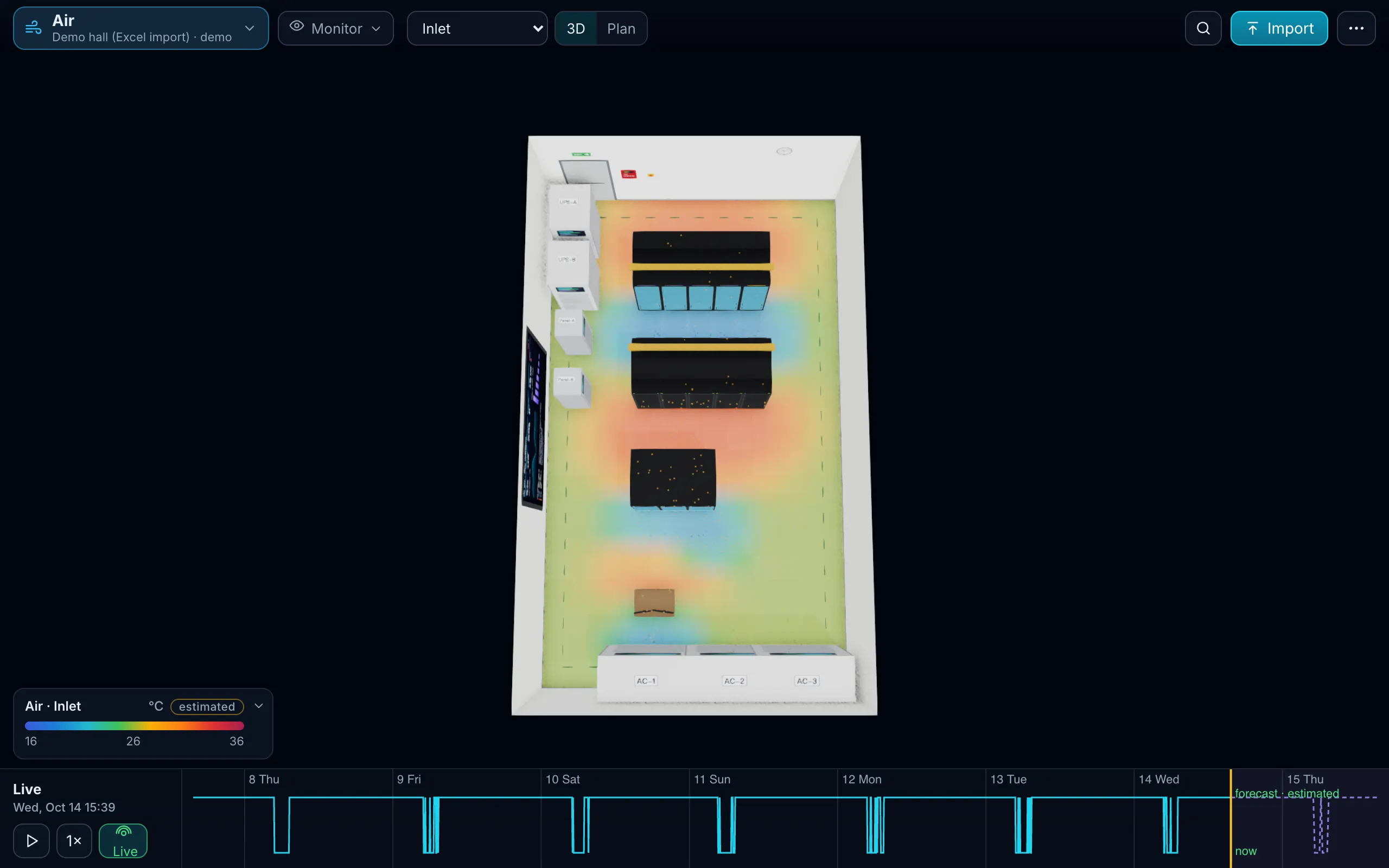
name,type,capacity_kw,serves,model, andchilled_from(the chiller that feeds a CRAH; empty means a DX unit). Heat above cooling capacity is flagged at import. - The Air view: rack inlet and exhaust temperatures, a floor heat map and airflow particles. Each rack front is coloured per U band from the model’s inlet profile, which adds a recirculation term that grows toward the top of the rack. Monitor shows the hottest inlet as a KPI, and temperature history from your monitoring goes into the Readings sheet so the model fits your room.
- Placement checks: adding a device in Design mode warns about side or rear intake and about heat against the cooling at the busy hour.
- Stop a cooling unit: fail a CRAH, chiller or AC unit and read the minutes until each rack inlet passes 27, 32 and 35 °C, estimated. In the demo hall, AC-1 stopping at peak load takes the hottest inlet past 27 °C after 10:35, 32 °C after 21:15 and 35 °C at 28:00, peaking at 35.9 °C with no devices off; the remaining units AC-2 and AC-3 run at 95 % of capacity. The clip below is that run.
What it does not do: containment is not a template column, so an imported room uses the model’s default for it. Use DC Sim to find the hot racks, the missing capacity and the minutes you have; have a mechanical engineer’s airflow study done before you build containment or a new hall. The facility layers page describes the Air, Water and Power layers, and Simulate lists the whole scenario library.
6 steps
Check that every device breathes front to back
Servers, storage and switches take air in at the front and exhaust at the rear. Fit switches with the fan option that matches the rack's orientation, or duct side-breathing gear.
Face the rows front to front
Two rows facing each other share a cold aisle; the next row turns its back to share a hot aisle. One row in a small room faces the cooling supply.
Place the cooling for the aisles
Supply into the cold aisles and return from the hot aisles: perimeter units at the ends of the hot aisles, perforated tiles only in cold aisles, in-row units blowing into the cold aisle.
Close every gap
Blanking panels in every empty U, brush grommets in cable cut-outs, no missing racks in a row, row ends closed. Then consider containment.
Measure inlet temperatures
At the top, middle and bottom of the hottest racks' fronts, against ASHRAE's recommended 18–27 °C. The top of the rack and the row ends run hottest.
Stop a cooling unit on paper first
Work out which racks it serves and how many minutes they have before the inlets pass 27, 32 and 35 °C. DC Sim estimates this per rack.
What happens in this clip
- Air layer: rack inlet temperatures as a floor heat map, estimated.
- The CRAH unit AC-1 stops at peak load (Simulate failure in its inspector).
- The scenario panel shows the minutes until the hottest rack inlet passes 27, 32 and 35 °C (10:35, 21:15 and 28:00 in this run), estimated by a zonal air model, not CFD; peak inlet 35.9 °C, no devices off.
- The alarm comes with advice before the real one: the remaining units AC-2 and AC-3 run at 95 % of capacity.
- End card: Design it. Run it. Fail it first.
What is a hot aisle / cold aisle layout?
Racks in rows that face each other front to front, so the servers in both rows draw air from one cold aisle, and back to back with the next row, so they exhaust into a shared hot aisle. Cooling supplies the cold aisles and takes its air back from the hot ones.
What inlet temperature does ASHRAE recommend?
ASHRAE TC 9.9's Thermal Guidelines for Data Processing Environments recommend 18–27 °C at the IT equipment inlet for classes A1 to A4. The allowable ranges are wider: 15–32 °C for A1 and 10–35 °C for A2. The fifth edition (2021) adds a high-density class, H1, with a recommended 18–22 °C.
Do blanking panels really matter?
Yes. An empty U is an open window from the hot aisle to the cold aisle, and hot exhaust flows back through it into the servers above and below. They are the cheapest airflow fix in the room and the first thing to check at a hot spot.
How do I lay out a small server room with one row of racks?
Face the racks toward the cooling supply and keep the return path at the back of the row. With a wall-mounted split unit, put its supply at the rack fronts and its intake behind them; a unit that blows across the backs of the racks feeds them their own exhaust. Blank every empty U and close the gaps at the row ends.
How fast does a server room heat up when cooling fails?
It depends on load, room volume and the cooling left. In DC Sim's demo hall, AC-1 stopping at peak load takes the hottest rack inlet past 27 °C after 10:35, 32 °C after 21:15 and 35 °C at 28:00, estimated by a zonal model, not CFD. Run it on your own room's sheets to get your numbers.
Does DC Sim replace an airflow study?
No. DC Sim estimates inlet temperatures with a zonal model, not CFD, so it is for finding hot racks, missing cooling capacity and the minutes you have when a unit stops. Containment designs and new halls still need a mechanical engineer's airflow study.
One Excel file. Your room in 3D.
Download the import template (v1.5, twelve sheets, only Devices required) and the filled example from our demo hall. No form, no email needed, no macros in the files.
Fill in the Devices sheet and send it with your walkthrough request; we import it on the call. What each sheet does